I really like my smart lightbulbs, but one niggle with all of them is that when you have guests staying, they frequently switch them off at the wall switches. A simple solution is to replace the smart bulb with a smart light-switch. However this is far from simple when you have a typical UK Hall/Landing 2-way switch arrangement. The problem is, if either switch is changed, you lose power to the light fitting - usually a ceiling pendant or batten. In most cases these switches have a permanent live connection, but they lack a neutral. This means that there is no smart lightswitch that will solve the problem. The solution is to put a smart switch in above the Ceiling Rose and take an output from that to the light itself. A great solution is to use a Shelly 1PM Gen 3 smart switch. It can look a bit daunting when you look at the ceiling rose connections, but it is actually straightforward:
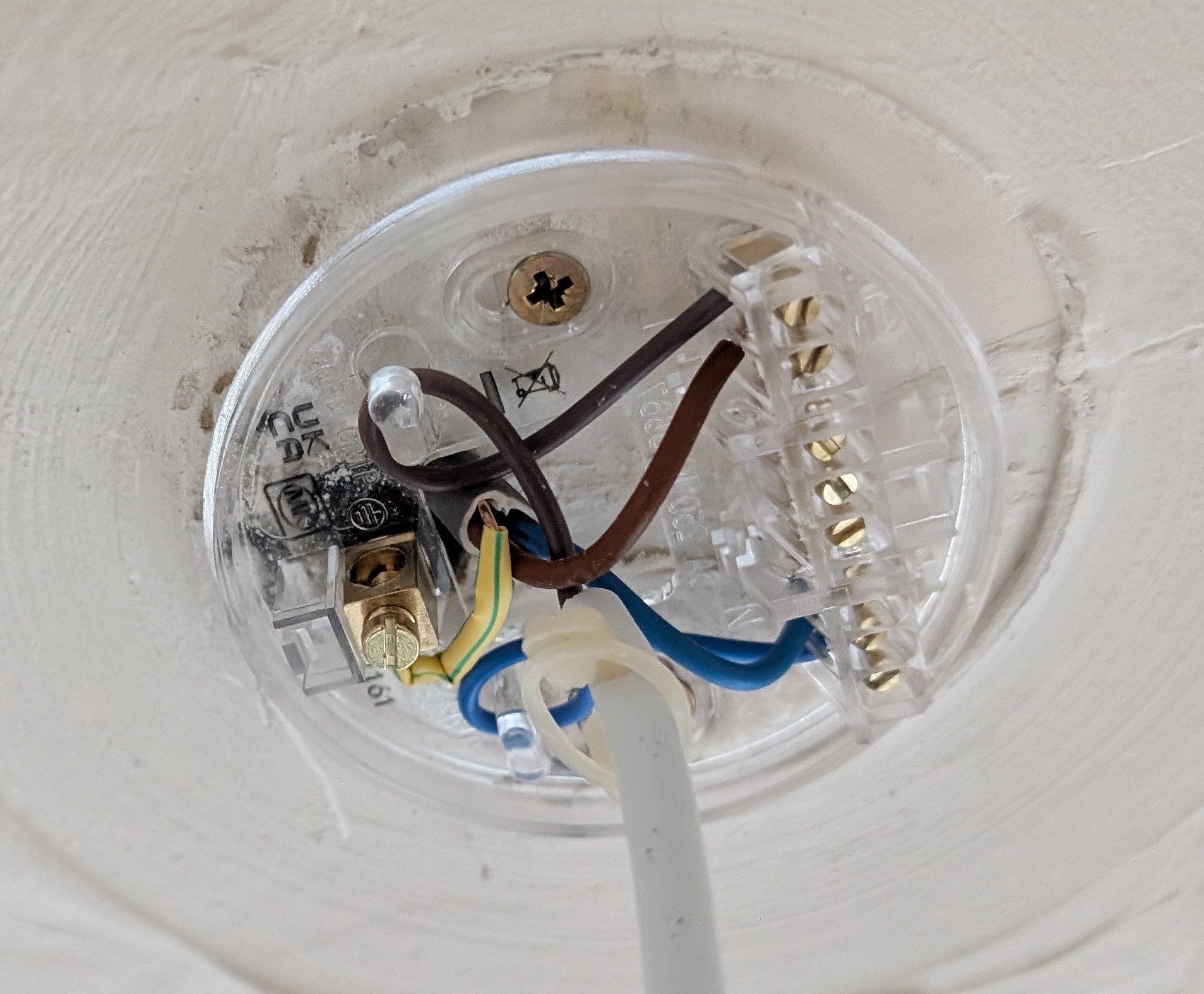
* WARNING - do not attempt unless you are competent and have switched off the light circuit at your consumer box. Verify the circuit is dead using a proper voltage tester, not just the switch. * 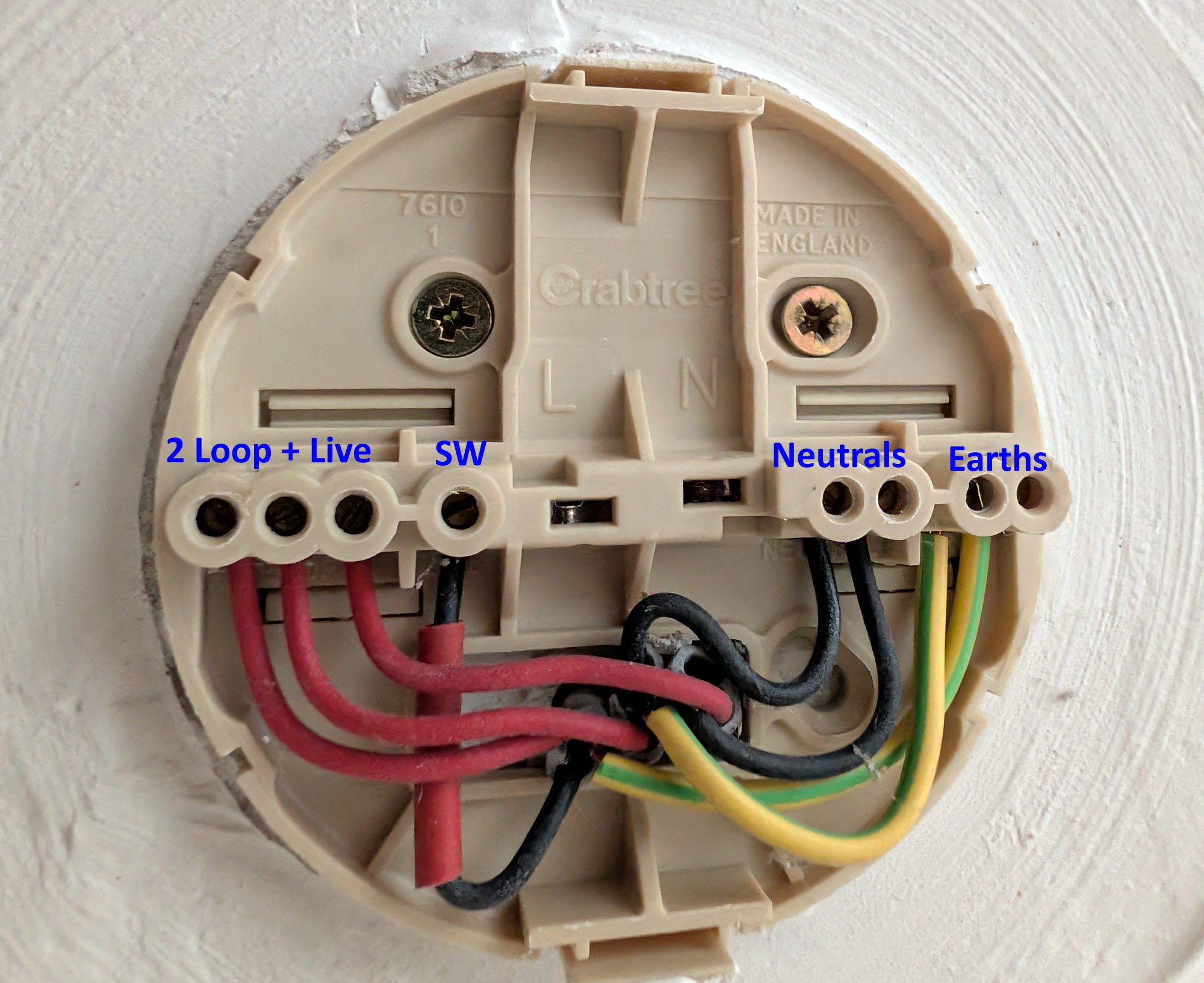 This is a Crabtree fitting - very common in the UK, but if you don't have this exact fitting it will be something similar. One nice feature of this unit is that when you clip the rose cover back on, the pendant wires are connected to a plug that fits into the L & N sockets in the middle.
The light itself gets power from the SW return from the 2-way switch arrangement. This is often "the wrong" colour for a live but has a red or brown sleeve on it. Don't lose that identifier! - I put some temporary insulation tape around mine so that it wouldn't fall off while I was making the new connections.
The Loop (permanent live) wires are connected together - sometimes two, sometimes three, depending on the circuit. Then there are neutrals connected together. There are also two earths in this case which are connected together on the ceiling rose, but they aren't usually connected to anything on the actual light pendant.
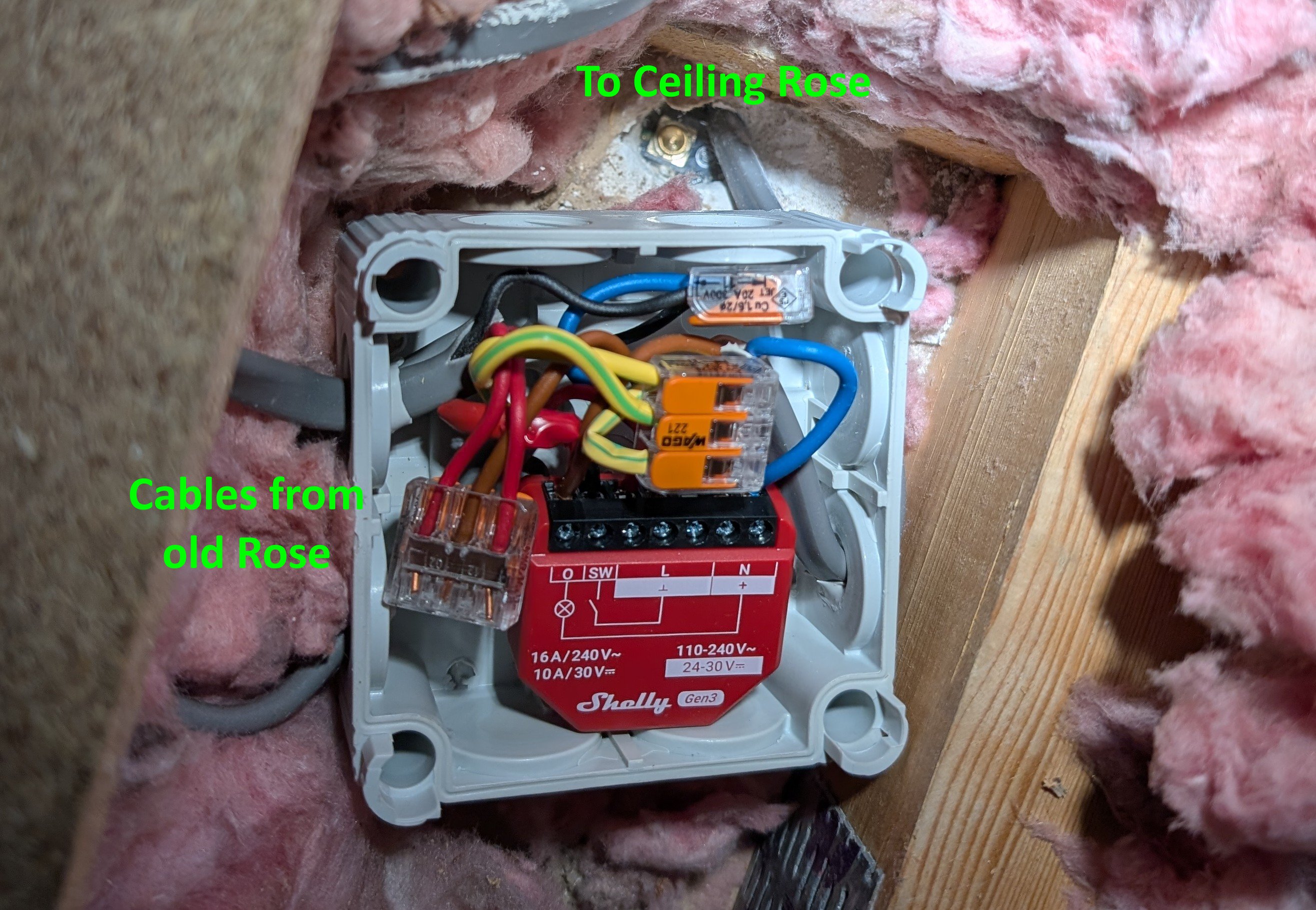
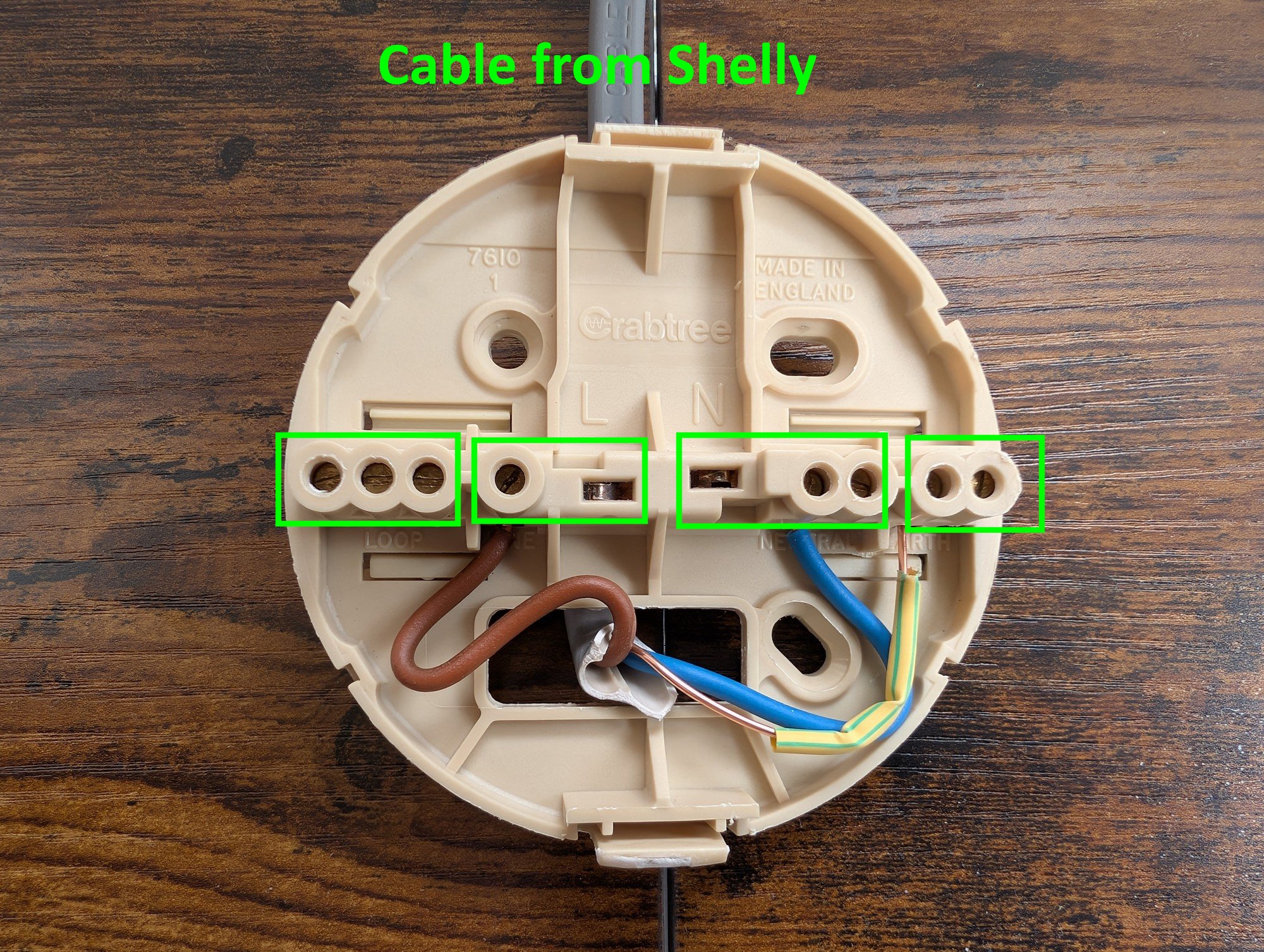
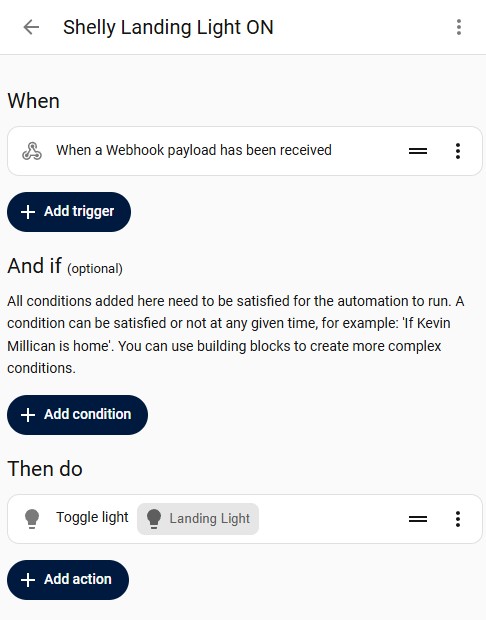
In the ceiling above the rose, you fit the Shelly inside a blank terminal box. You may have to use some Wago connectors to join some of the wires together, but the wiring removed from the above would look like this: 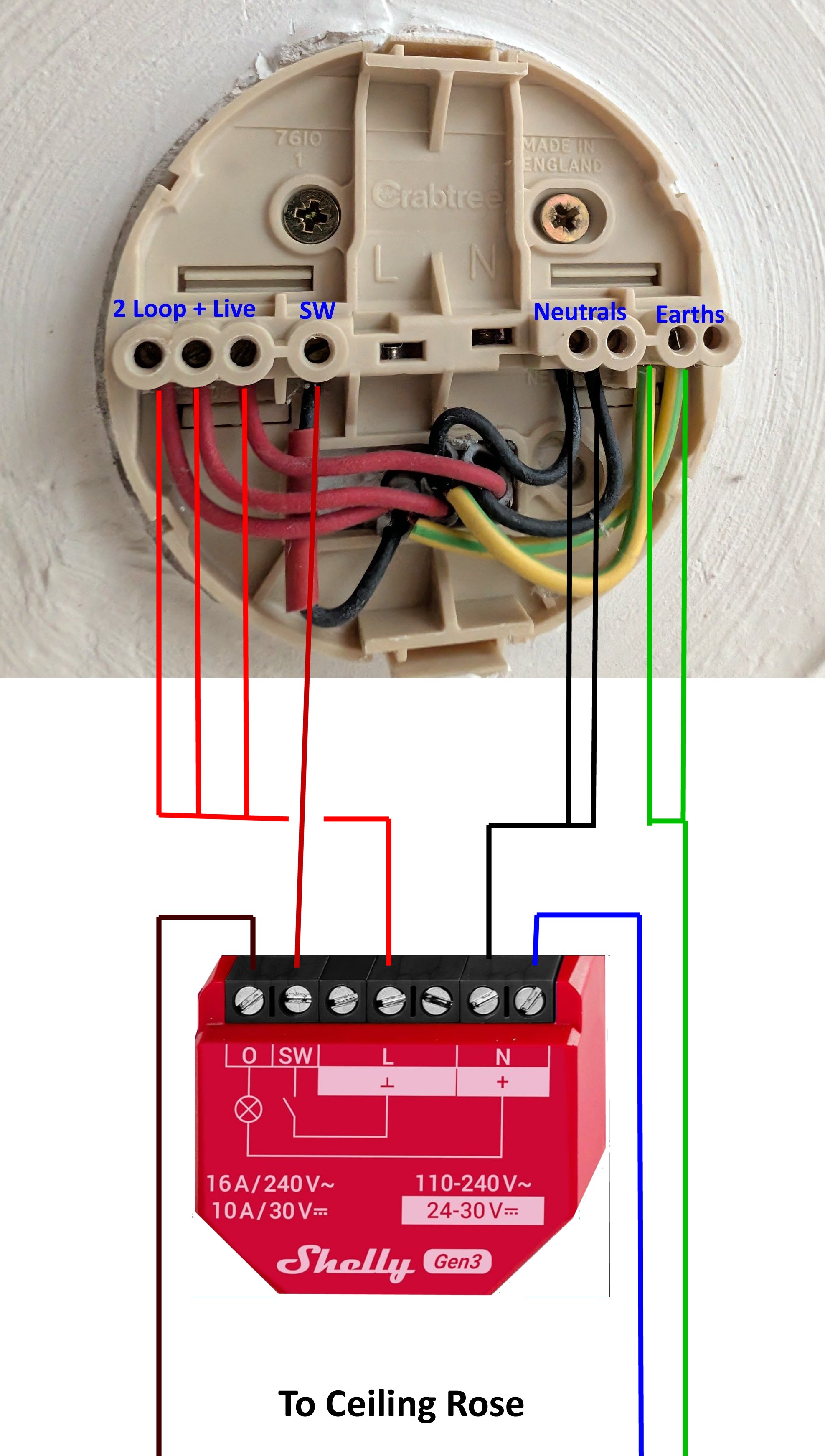 I was fortunate that I was able to access the wires from the loft above the light fitting. It can be done from below, but it's more difficult as you have to make the hole for the wires large enough to push the terminal box through it above the light fitting. As the original ceiling rose is likely screwed into a rafter, this hole will usually be offset, requiring some redecoration afterwards. The Shelly has 3 Live terminals and 2 Neutral ones, you can use these along with Wago connectors to join the wires that need to be connected. Here is the Shelly connected to all the wiring from the original rose terminals. Note that you have to add a new piece of cable and pass it back down through the hole. I damaged the old rose fitting when I opened it and had to use a new one: However, if you re-use the original Crabtree one, or similar socketed one, the new cable from the Shelly box connects like this (sorry I didn't have enough earth insulator sleeve handy to make this look tidier): Note that I've added green boxes to illustrate the four separate connections possible. All the terminals within each green box are connected together. Now it is time to test. When the circuit is switched on again at the consumer box, it should operate exactly as it did before. Assuming everything is correct, set up the Shelly with the App and connect it to the home network over wifi. The trick to getting this to work easily with Home Assistant is as follows: In the Shelly App Device settings / Input/Output settings, set relay type to "Detached" switch mode.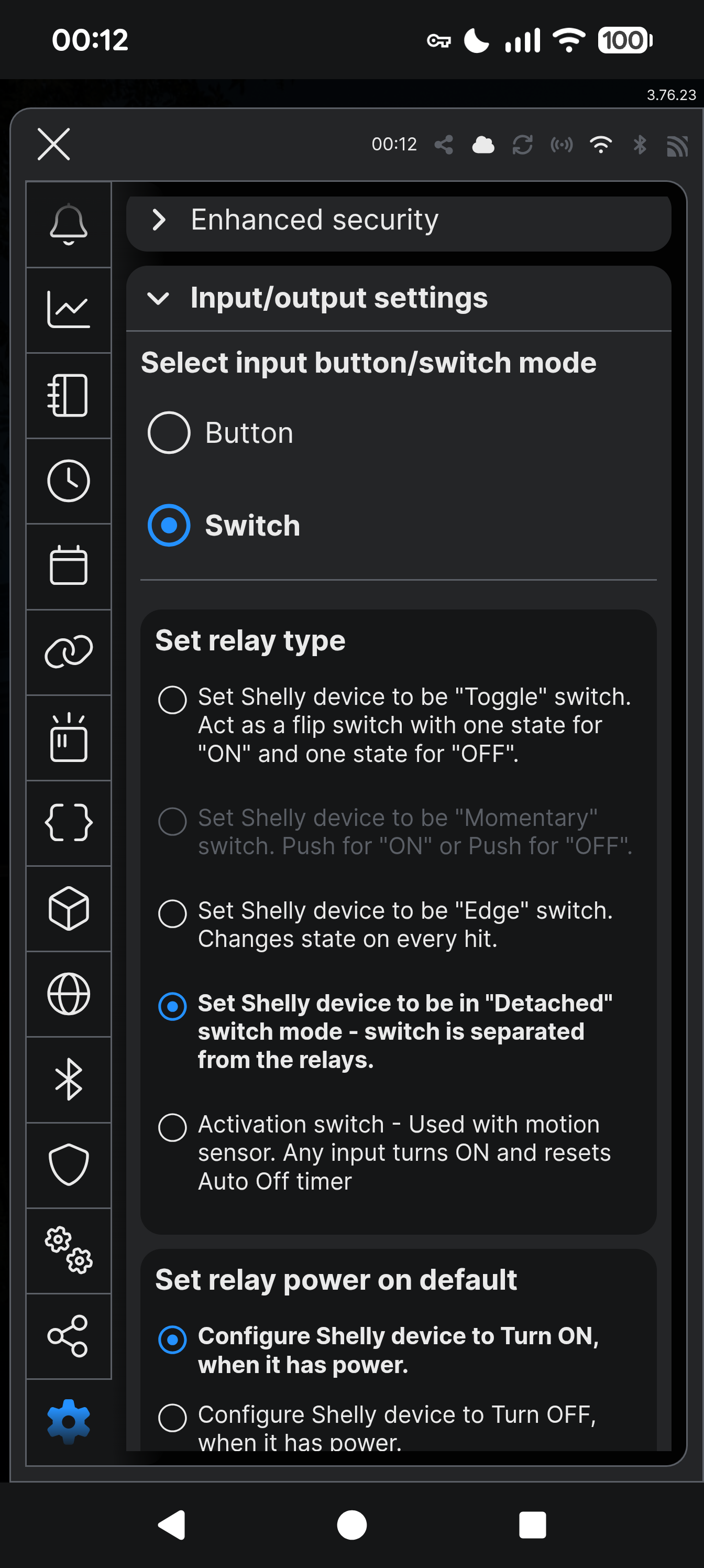 The "Detached" Switch Mode is essential so that when someone changes a lightswitch, it doesn't actually toggle power to the light fitting. In Home Assistant, you need to create an automation that uses a WebHook payload (I actually use two - one for off and one for on but you can make do with a single one) When you create the webhook, it provides a URL directed to your Home Assistant server. Ensure that the URL type is set to include GET and POST (there's a gearwheel icon next to the copy URL icon). Home Assistant webhooks do not require authentication when using /api/webhook/..., so Shelly Actions work locally without tokens. Finally, in the Shelly App or Web interface, you need to setup two actions as follows: - Create a New action and select component Input(0)
- Give it a name, eg. "HA switch ON"
- Set the Event trigger to "Input Toggled On"
- At the bottom, select Add URL and paste in the Webhook copied from your automation.
Then, - Create a New action and select component Input(0)
- Give it a name, eg. "HA switch OFF"
- Set the Event trigger to "Input Toggled Off"
- At the bottom, select Add URL and paste in the Webhook copied from your automation.
The end result is: - The light pendant is always powered unless you turn off the Shelly light switch with the Shelly App.
- Pressing either of the 2-way switches will turn the light on or off as users would expect.
- Any automations for the lightbulb will operate as expected in Home Assistant or other Smart software.
Additional Comments Why not use Matter? - it can be unstable with multi-controller setups.
- it doesn't solve the 2-way wiring problem, ie. Matter bulbs would still lose power if the switch is toggled.
Optional Advanced Features The Shelly App Input/Output settings have an option to set "Button" mode instead of "Switch" mode. If you replace your traditional rocker switches with momentary (pushbutton) switches, the Shelly can detect Double‑Press, Long‑Press, and Triple‑Press events. These can trigger scenes, dimming presets, or other automations in Home Assistant. Traditional UK 2‑way rocker switches do not reliably support these advanced press patterns, but modern pushbutton switches can.
|  Kevin Millican